Data Structures
Overview
Data structures are an extension of variable types. This is a powerful way to group related information into a new data type.
For example, if we want to represent a Seneca Student, we could group all the closely related attributes together into one variable type and make a variable of this new type which would contain all that related information in a single variable. For this example, let's say we want to manage the student ID, program code, and their graduation status.
Structure DEFINITION:
To define a new data structure, it starts with the new type name and followed by a list of attributes that comprise the new type.
[New Data Structure TYPE name]
 - [Attribute 1]
 - [Attribute 2]
 - [Attribute 3]
 - etc.
Here's how the Seneca Student type would be defined.
Pseudocode:
SenecaStudent
- studentID
- programCode
- isGraduated
Flowchart:
All data structures would be grouped together in their own dedicated section with each data structure in a separate rectangle.

Creating a new data TYPE called SenecaStudent will enable us to represent these three attributes of data in a single variable (the student ID, program code, and the graduation status of the student).
The structure DEFINITION is NOT a variable - it is only describing the attributes that can be managed (represented) for this new type.
Structure VARIABLE
As mentioned back in the variables topic, data type information (example: whole number, fractional number, characters etc.) is not supported in all programming languages and so we are maintaining the language agnostic approach and not specifying this level of detail when we declare variables.
The exception to this rule is for data structures. To be able to USE a data structure (based on its definition), we must create a variable including the type so it will be clear it is not a standard variable.
Using the SenecaStudent structure example, this is how we can declare a variable of type SenecaStudent:
Pseudocode:
DECLARE:
      student = EMPTY (type: SenecaStudent)
Flowchart:

Now that we have a variable called student of type (SenecaStudent), we will be able to refer to and assign three related pieces of data using this single variable.
Access Structure Data
Once you have a variable declared that is a structure type, you will need to provide some extra syntax (.) to access or refer to the attributes.
Accessing the attributes for the variable student from our previous example (recall, student is of type SenecaStudent), here is how we would display the three attributes.
Pseudocode:
DISPLAY:
      "Student ID: [student.studentID]
       Program   : [student.programCode]
       Graduated?: [student.isGraduated]"
Flowchart:

The dot (.) syntax is very common among most programming languages to access sub-components of an object.
Structure COMPOSITION
Often, we need to include other defined structured data within another structure as there may be a loosely associated relationship involved. Let's revisit the previous example to demonstrate what this means.
Every student will have name information associated to their student ID. Names can be be simple, but they can also have more structure to them such as:
- First name
- Last name
- Middle name
- Nickname (short version of the name)
- Prefix (ie: Mx., Mr., Mrs., Ms., Master, etc.)
We can update our student example now to include this data representation:
Pseudocode:
NameInfo
- firstName
- lastName
- nickname (short version of the name)
Then add this to our SenecaStudent data structure as a member:
SenecaStudent
- studentID
- name (type: NameInfo)
- programCode
- isGraduated
Notice the additional attribute after studentID? We explicitly identify the name attribute as being of a special NameInfo type.
Flowchart:

Accessing the details of the name follows the same convention as before, only now we will need to "drill" down into the data using the . dot notation when we get to that attribute. Here's how we would display the first and last name of a student with this new change:
Pseudocode:
DISPLAY:
      "Student ID: [student.studentID]
       Last Name : [student.name.lastName]
       First Name: [student.name.firstName]
       Program   : [student.programCode]
       Graduated?: [student.isGraduated]"
Flowchart:

Notice the extra level of using the dot (.) to access the attributes of the name? Since name is a structure, we need to access its attributes using the . notation.
Collection of Structures
Now that we have the ability to create structures to better contain related data - let's look at how you can have a collection of structures. In the above examples, we have a single student represented in a variable named "student". What if we want to manage many students? Just as we did in the introduction to collections, we can specify a collection of a new type SenecaStudent.
Pseudocode:
DECLARE:
      students = EMPTY (Collection of type: SenecaStudent)
Flowchart:

Example - Putting it all together!
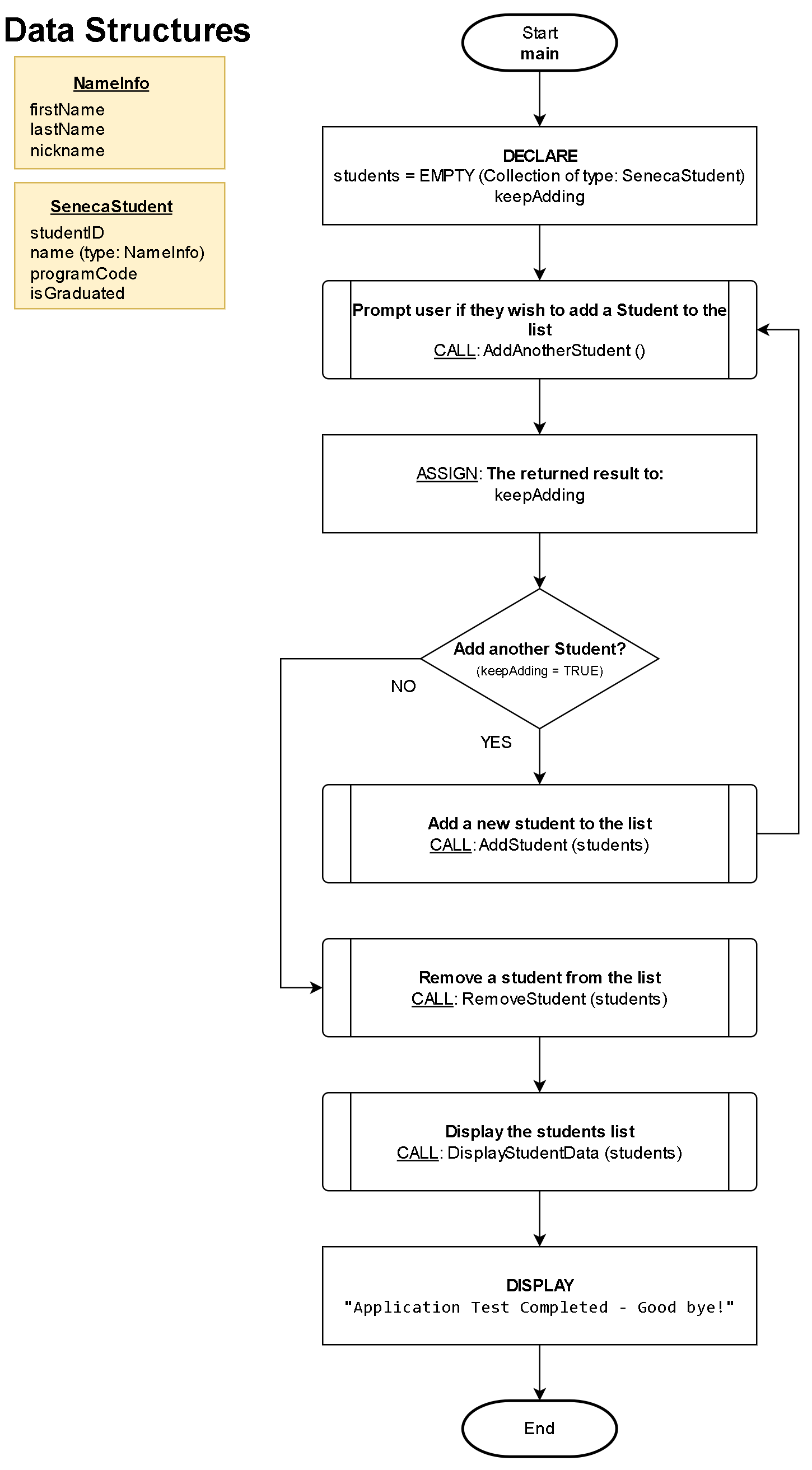
Here is an example of putting it all together where we will support adding, removing, and displaying the data for a collection of SenecaStudent data.
Flowchart
This is the main function and logic flow.
Pseudocode
First we will define the SenecaStudent data structure and then the four detailed functions needed in this example.
----------------------------------------------------------------
Data Structures:

NameInfo
- firstName
- lastName
- nickname (short version of the name)

SenecaStudent
- studentID
- name (type: NameInfo)
- programCode
- isGraduated

----------------------------------------------------------------
Function: AddAnotherStudent()
----------------------------------------------------------------
Description/Purpose:
Prompt the user to confirm if another student needs to be entered.

Argument(s) : **NONE**
Return Value: TRUE for "YES"
              FALSE for "NO"
----------------------------------------------------------------

AddAnotherStudent()

1. DECLARE:
      response = FALSE

2. DISPLAY:
      "Do you want to add a student?"
      [BUTTON: YES]     [BUTTON: NO]

3. What button was pressed?
      A) YES:
            1) ASSIGN: response = TRUE
      B) NO:
            1) ASSIGN: response = FALSE

4. RETURN: response

5. End
Function: AddStudent (students)
----------------------------------------------------------------
Description/Purpose:
Prompt the user to enter the new student data and add it to
the collection.

Argument(s) : students (Collection of type: SenecaStudent)
Return Value: Nothing
----------------------------------------------------------------

AddStudent (students)

1. DECLARE:
      newStudent (Type: SenecaStudent)

2. DISPLAY:
      "Enter a student ID:"

3. ASSIGN: newStudent.studentID = [User entered value]

4. DISPLAY:
      "Enter the first name:"

5. ASSIGN: newStudent.name.firstName = [User entered value]

6. DISPLAY:
      "Enter the last name:"

7. ASSIGN: newStudent.name.lastName = [User entered value]

8. DISPLAY:
      "Enter the program code:"

9. ASSIGN: newStudent.programCode = [User entered value]

10. DISPLAY:
      "Has the student graduated (YES|NO)?:"

11. ASSIGN: newStudent.isGraduated = [User entered value]

12. ADD the new student to the collection: students.ADD(newStudent)

13. DISPLAY:
      "Student added!"

14. End
Function: RemoveStudentData (students)
----------------------------------------------------------------
Description/Purpose:
Removes a student from the students collection where it matches
on the user-entered student ID.

Argument(s) : students (Collection of type: SenecaStudent)
Return Value: Nothing

----------------------------------------------------------------

RemoveStudentData (students)

1. DECLARE:
      tmpStudent
      tmpID
      foundMatch = FALSE
      keepLooking = TRUE

2. DISPLAY:
      "Enter the studentID of the student to remove:"

3. ASSIGN: tmpID = [User entered value]

4. Continue searching the collection? (keepLooking = TRUE)
      A) YES:
            1. ASSIGN: tmpStudent = students.NEXT
            2. Is tmpStudent empty?
                  A) NO:
                        1. Does the entered ID match this student? (tmpStudent.StudentID = tmpID)
                              A) YES:
                                    1. REMOVE the current student item: students.DELETE
                                    2. ASSIGN: foundMatch = TRUE
                                    3. ASSIGN: keepLooking = FALSE
                  B) YES:
                        1. ASSIGN: keepLooking = FALSE

            3. REPEAT: from Step #4

5. Was a match found (and student data deleted)? (matchFound = TRUE)
      A) YES:
            1. DISPLAY
                  "Student has been removed from the list!"
      B) NO:
            1. DISPLAY:
                  "Student could not be found."

6. End
Function: DisplayStudentData (students)
----------------------------------------------------------------
Description/Purpose:
Display each student in the students collection (iterate/loop).

Argument(s) : students (Collection of type: SenecaStudent)
Return Value: Nothing

----------------------------------------------------------------

DisplayStudentData (students)

1. DECLARE:
      tmpStudent

2. DISPLAY:
      "Here are the stored students:"

3. ASSIGN: tmpStudent = students.NEXT

4. Is tmpStudent empty?
      A) NO:
            1. DISPLAY:
                  "Student ID: [student.studentID]
                  Last Name : [student.name.lastName]
                  First Name: [student.name.firstName]
                  Program   : [student.programCode]
                  Graduated?: [student.isGraduated]" (newline)
            2. REPEAT: from Step #3

5. DISPLAY:
      "There are [students.COUNT] Student's stored."

6. End