Modularity with Functions
Overview
Modularity is an important aspect of programming as it provides flexibility in orchestrating logic needed for efficient reusability and efficient management of solution components. The most common component of modularity is the use of functions.
Functions represent algorithms comprised of several logical steps which perform a specific task. Functions are defined once and in one place. This is what makes it efficient and simpler to manage since modifications and trouble shooting bugs directs you to a single source.
When it's time to construct a complete solution, it is nice to be able to reference functions which do all the work (hiding the details) and simplifies the overall readability of the instructions so long as good naming practices have been applied.
Sometimes access to the composition of a function may not be possible. When you don't have access to the details of a function we refer to this as a closed-box.
As mentioned in the Computational Thinking sections on:
-
Decomposition: Functions are mostly identified when going through the process of breaking things down into smaller logical parts.
-
Pattern Recognition: Is another area where functions may be identified where you can extract a common piece of logic that can be reused in multiple places throughout the solution.
-
Abstraction: Usually based on a pattern of functions where the concept is the same and can be combined to simplify the usability of a single function.
Function Identifiers (name)
Similarly, as variable identifiers should be well thought out and purposefully named to best describe the information it will be representing, so should the function naming process. Variables are related to DATA, but functions are related to ACTION. Therefore, function identifiers should be well thought out and purposefully named to best describe their logical purpose and action. Providing meaningful names to functions will contribute towards easier to read and manage logic (or code).
Reading logic that is applying functions should be like reading a standard sentence or close to it. There should be no mystery of WHAT the function's purpose is based on it's name however, like in variable naming practices, we need to be mindful of efficiency as we don't want to be referring to excessively long names (and in the case of programming code, we don't want to be typing them either!). That being said, unlike variable naming, function names can be a little longer given the importance of having the name best represent WHAT it does so we don't want to over abbreviate.
For example, if we need a function to write program data to a file in JSON format we could create a function with the following signature:
- Function:
WriteDataJSON (data) - Parameter:
datais what will be written to file in JSON format - Returns: TRUE (success) or FALSE (fail)
Here's an excerpt of how it would be called:
1. DECLARE:
      data
      result

2. -> 99. [ logic capturing a lot of information stored to 'data' ]

100. ASSIGN: result = WriteDataJSON (data)
101. Was the data successfully exported to a file?
      A. result=TRUE:
            1. DISPLAY:
                  "Data exported to JSON file!"
      B. result=FALSE:
            1. DISPLAY:
                  "FAILED to write to file."
102. End
Now let's consider a poorly named function that writes data to a JSON formatted file. If we replaced the name with FormatDataJSON (data). While not totally incorrect, it does not reveal the fact that data is written to a file which the term "Write" successfully conveys. Another poor name would be StoreData (data) - this does not reveal the formatting standard used to save the data and the term Store can also refer to variables not files.
Do NOT obfuscate function names as this renders them meaningless to the logic if you can't easily understand a functions purpose based on the name alone:
- a (data)
- HorseGoat (data)
- abcdef (data)
These functions are not usable since we don't know what their purpose is based on their names!
Function Documentation
Functions should be BRIEFLY described to elaborate more on WHAT the purpose of the function is to expand on the name itself (the names alone are usually not enough). This would include parameter(s) (expected arguments) and return value.
This is a very important aspect of programming especially when you get into collaborative coding and sharing of custom libraries like API's (Application Programming Interface). Functions need to be summarized so the use of the function is clear and other programmers will know how to properly apply the function.
For the purposes of these notes, pseudocode functions will be documented with a series of dashes: ------ before and after the description.
See the below sub-section on Returning Information for some examples. Going forward, all examples will demonstrate function level documentation accordingly.
Flowchart functions will almost always be the main function and generally will not require any documentation unless it is specific to an example requiring further detail.
Here is the template:
----------------------------------------------------------------
Description/Purpose:
   [Provide a brief description of the function's purpose]

Argument(s) : [List each parameter/expected argument and if
               needed, a brief associated description]
              Example:
              [param-1: describe briefly what this is for]
              [param-2: describe briefly what this is for]

Return Value: [Describe possible return values if applicable]
----------------------------------------------------------------

[FunctionName] ( [Parameter(s)] )

1. [list of steps...]
Closed-Boxes
There will be times when we need to use 3rd-party logic (known as API's : Application Programming Interface) or other prepared logic from system library functions where we don't have access to the details of how they work.
These functions are known as "closed-boxes" (formerly "black boxes"). Closed-box functions are like "magic" because you call them and they do what you expect without explicitly knowing how it performed the task. It is important to note, sometimes this can be a problem because if there is a bug (error) or a missing piece of functionality in that piece of logic, there is nothing you can do to address it other than to redefine your own version of that logic in your own composed function.
If you are calling a closed-box function from a flowchart, use the striped rectangle symbol to represent a complex function.
High-Level Functions
High-level functions are usually highly abstracted in that they can represent a lot of functionality/logic usually because this type of function will call many other functions to complete its task. This is like seeing the solution from "a birds eye view".
One such function that is commonly required in many programming languages is "main" which behaves as the entry-point to the application (or where the logic begins and typically ends).
For the purposes of these notes, we'll be designating a flowchart to always represent this higher-level view of the overall solution. The directive of a flowchart is to describe an overall set of instructions in a simple to understand format for non-technical persons, so it is a natural and suitable application of a flowchart.
Low-Level Functions
Unlike high-level functions, lower-level functions are a lot more focused and detailed on a task that is highly limited in scope - most functions fit this category and are constructed to be reusable or to remove complexity from other larger scoped functions.
For the purposes of these notes, we'll be designating pseudocode to always represent these lower-level detailed parts of the solution algorithm.
Passing Information
Functions usually require information to be provided or sent to it to do its task. When a function requires information, it is constructed with one or more parameters. Parameter is a fancy term used that essentially means a variable.
For example, if we create a function that is responsible for displaying the date and time in a standard ISO 8601 format (YYYY-MM-DD HH:MM:SS), the function would require all six of those specific parts of data to be supplied:
DisplayDateTime (year, month, day, hour, minute, second)
The comma delimited list of the date and time parts are the parameters. The parameters act as variables which can be used in the function logic to access the values sent to the function.
When it comes time to use this function, we will CALL it and supply the function with the information it requires (we call this "passing" data to a function) in the form of arguments. An argument is a value sent to a function.
Since the DisplayDateTime function has six parameters, we will need to send six arguments in the order it is expecting it:
CALL: DisplayDateTime (2025, 10, 25, 11, 53, 45)

Each argument sent to the function will be assigned to the corresponding parameter variable and then the function would construct the output assembling the variables into their appropriate sequence:
year-month-day hour:minute:second
The expected outcome of this function call, would be to display the date time data as:
2025-10-25 11:53:45
Returning Information
Functions often do more than just an explicit task - it is quite common for information to be returned to the caller of the function (ex: back to where the function was called from). Most programming languages support flexible methods in how information can be returned from a function:
- Explicit
- Implicit
- Both explicit and implicit
Let's have a look at these methods and how they will be documented in pseudocode.
Since these notes will be limiting the use of flowcharts to the main overview process only, we won't need to concern ourselves with documenting return values for flowcharting.
Explicit Return
Returning information from a function explicitly is accomplished by using the keyword: return. This method provides a single variable of information to be returned from the function.
For example, if we have a function: Multiply (number, multiple) which will return the results of multplying the provided number by the provided multiple, the logic would look like the following:
Function: Multiply (number, multiple)
----------------------------------------------------------------
Description/Purpose:
  Demonstration of a function that returns a value implicitly.

Argument(s) : number (operand 1 to be multiplied)
              multiple (operand 2 to be multiplied)
Return Value: result of the multiplication
----------------------------------------------------------------

Multiply (number, multiple)

1. DECLARE:
      result

2. ASSIGN: result = number * multiple

3. RETURN result

4. End
This can be refined by not creating a variable:
Multiply (number, multiple)

1. RETURN number * multiple

2. End
Here is how the function can be used from a flowchart:
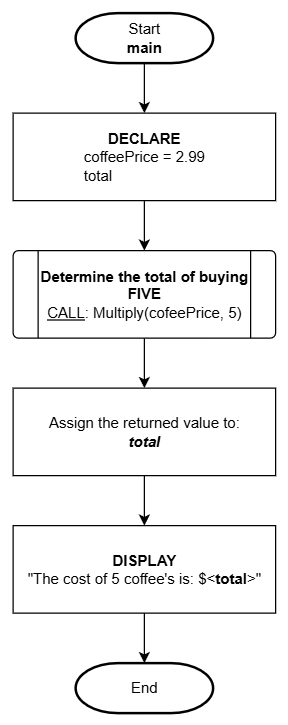
Here is how the function can be used from pseudocode.
Function: main()
----------------------------------------------------------------
Description/Purpose:
  Demonstration of calling a function "Multiply" that returns
  a value explicitly.

Argument(s) : NONE
Return Value: NONE
----------------------------------------------------------------

main()

1. DECLARE:
      coffeePrice = 2.99
      total

2. ASSIGN: total = CALL: Multiply(coffeePrice, 5)

3. DISPLAY:
      "The cost of 5 coffee's is: $<total>"

4. End
Implicit Return
Returning information implicitly involves updating a parameter variable. The understanding with this method is that any changes made to a parameter variable will directly affect the original. This can simplify how return values are documented but also can lead to missed data changes since it is not as clear.
Let's do another version of the preceding example using this method (notice the extra parameter total).
Function: Multiply (number, multiple, total)
----------------------------------------------------------------
Description/Purpose:
  Demonstration of a function that returns a value implicitly.

Argument(s) : number (operand 1 to be multiplied)
              multiple (operand 2 to be multiplied)
              total (result of multiplication)
Return Value: NONE
----------------------------------------------------------------

Function: Multiply (number, multiple, total)

1. ASSIGN: total = number * multiple

2. End
The total parameter variable was used as the return value from the function by assigning the result of the calculation to that variable.
Here is how the function can be used from a flowchart:
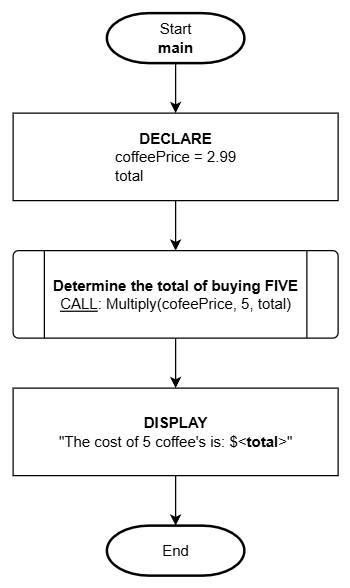
Here is how the function can be used from pseudocode.
Function: main()
----------------------------------------------------------------
Description/Purpose:
  Demonstration of calling a function "Multiply" that returns
  a value implicitly.

Argument(s) : NONE
Return Value: NONE
----------------------------------------------------------------

main()

1. DECLARE:
      coffeePrice = 2.99
      total

2. CALL: Multiply(coffeePrice, 5, total)

3. DISPLAY:
      "The cost of 5 coffee's is: $<total>"

4. End
The advantage of implicit returns is it is not limited to a single variable return value like the explicit method. The implicit method, can return multiple values through more than one parameter variable!
Some programming languages refer to implicit return values through parameters as:
- output parameters
- pointers
- references
Both Explicit AND Implicit Returns
A combination of explicit and implicit methods can be done too! Expanding on the preceding examples, we will add a tax component. The calculated tax amount will be returned implicitly via the tax parameter and the total (including tax) will be returned explicitly:
Function: Multiply (number, multiple, tax)
----------------------------------------------------------------
Description/Purpose:
  Demonstration of a function that returns values applying both
  the implicit and explicit methods.

Argument(s) : number (operand 1 to be multiplied)
              multiple (operand 2 to be multiplied)
              tax (result of tax portion)
Return Value: total including tax
----------------------------------------------------------------

Multiply (number, multiple, tax)

1. DECLARE:
      result
      taxPercent = 0.13

2. ASSIGN: tax  = number * multiple * taxPercent
3. ASSIGN: result = (number * multiple) + tax

4. RETURN <result>

5. End
Here is how the function can be used from a flowchart:
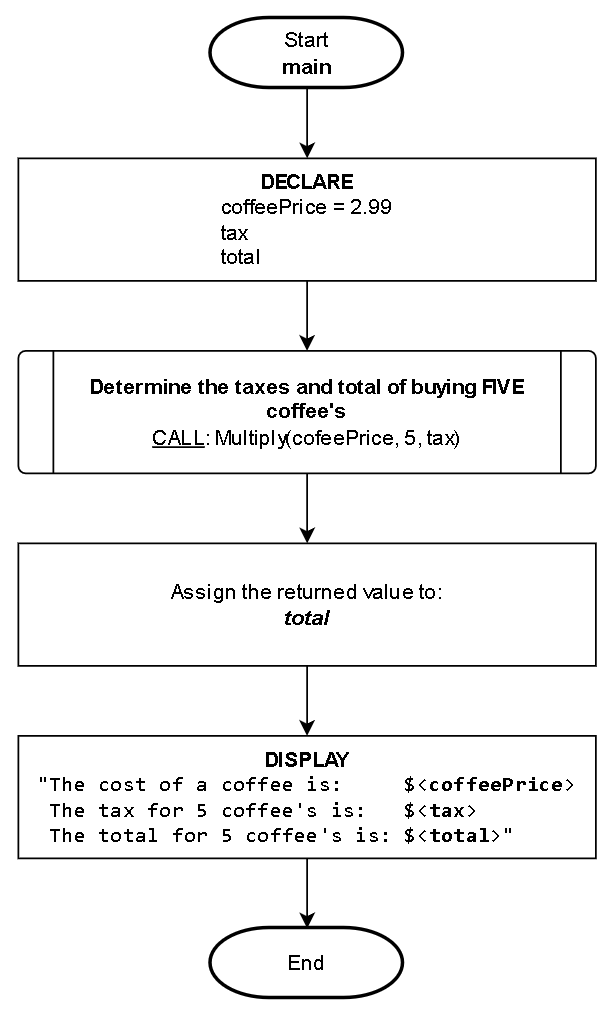
Here is how the function can be used from pseudocode:
Function: main()
----------------------------------------------------------------
Description/Purpose:
  Demonstration of calling a function "Multiply" that returns
  values applying both implicit and explicit methods.

Argument(s) : NONE
Return Value: NONE
----------------------------------------------------------------

main()

1. DECLARE:
      coffeePrice = 2.99
      tax
      total

2. ASSIGN: total = CALL: Multiply(coffeePrice, 5, tax)

3. DISPLAY:
      "The cost of a coffee is:     $<coffeePrice>
       The tax for 5 coffee's is:   $<tax>
       The total for 5 coffee's is: $<total>"

4. End
As you can see in this example, it can be easy to "miss" how the tax is assigned because it is IMPLICITLY updated by the function.